

Checking the crew list…


Checking the crew list…

How it works
Most boards won’t say why you saw a job or why nobody replied. We publish the formula, show both sides the breakdown, and hold employers to three-day replies.
Step by step
Five minutes for a worker profile. A business day for employer verification. Then the matching does the chasing.
Workers
Build a profile, chips not essays
Trade, level, tickets with expiry, the skills you can do on your own, where you live and where you’ll work, when you’re available. About five minutes. A strength meter shows what’s worth adding next.
See every open job with your score
Each card shows a 0–100 score and the seven factors behind it. Tap in for the full breakdown and a “to close the gap” list linked to the part of your profile to fix.
Tap “I’m interested”
The employer gets your profile card and match breakdown. No resume, no cover letter. Answer up to two screening questions if they asked any, then track it in one place.
Hear back within 3 days
Every application gets a status change. If an employer leaves people hanging, their postings sink and eventually pause until they catch up.
Employers
Get verified
Prove you’re a real NL business once: business number, WorkplaceNL account or COR certificate. Usually a business day. This is what keeps ghost jobs and scams out.
Post in two minutes, or search first
Describe the job plainly and the AI writer drafts the posting with the right catalogue skills and tickets. Or skip posting and search the registered workforce directly.
Every candidate comes with the why
Same score, same breakdown the worker sees. Tickets show expiry dates. Availability is a date, not a badge. Crew Finder ranks “N of trade in place by date”.
Move fast in one place
Pipeline stages, in-app messaging, one-tap interview slots and offers. The best trades workers are gone in 48 hours; the tools are built for that.
The formula
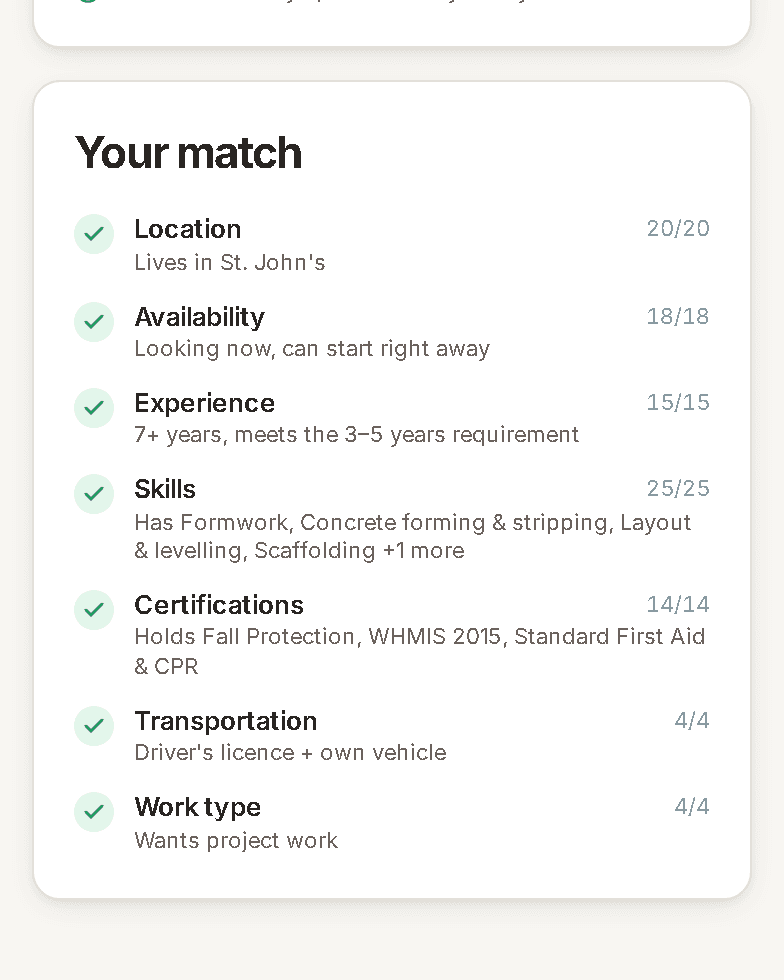
This is the exact weighting used in the code. Tap a factor to see how points are awarded. AI only writes the explanation.
Required skills count 80%, preferred 20%. Full marks when you have every required skill; partial at half.
Same community = 20. Same region = 18. A region you said you'd work in = 16. Willing to travel or camp = 11.
“Looking now” = 18. Available before the start date = 18. Working but open = 11. Not looking = 0 (and the score is capped at 30).
Meet the level asked = 15. One level under = 9. Apprentice on an apprentice-friendly job = 9. Wrong trade caps the whole score at 45.
Required tickets count 85%, preferred 15%. Expired tickets don't count — and the breakdown says so.
Only scored when the job needs a licence or vehicle. Half marks if you have one of the two.
Full marks when the posting's type (full-time, project, seasonal…) is one you said you want.
Hard cap · 45
Different trade
Wrong trade (and not an entry-level path) caps the score at 45, and says so.
Hard cap · 30
Not looking right now
Caps at 30 and hides you from matches until you flip it back.
Anonymous by default
This is why BuildNL exists. On the big boards, posting your trade means your number ends up on a recruiter’s list within the hour. Here employers see your trade, tickets and experience — and nothing that identifies you — until you personally approve them, one employer at a time. Your resume has an anonymous version too: same employers, dates, duties and tickets, no name or contact. Public reporting on the Workforce pulse is counts by trade and region, never a profile.
Employers see the work, not the person
A trade, an experience level, skills with levels, tickets with expiry dates, the region you’ll work in — and a code name like “Carpenter · 7F2A”. No name, no photo, no phone, no email.
They have to ask
An employer taps “Request contact details” and writes you a line. It lands in your notifications and on your Who can see me page. Nothing moves until you answer, and they can only ask again once a week.
You choose what they get
Four separate switches: your name and photo, your phone, your email, your full resume. Approve some, not others. Decline with one tap and nothing is shared.
You can take it back
One Revoke button per employer. They drop straight back to the code name, keep nothing, and your applications stay exactly where they were.
Applying is your call too
The “I’m interested” box has a switch: share your details with this employer, or stay anonymous and make them ask. Same on invitations.
Profile visibility
Separate from your name: this is whether an employer can see the anonymous card in the first place.
Employers can find me
Verified employers can search for you and reach out. Contact details stay private until you respond.
Only employers I apply to
You're hidden from search. Employers only see you after you express interest in their job.
Temporarily hide my profile
Nobody can see you. Your profile stays saved for when you're ready.
Notifications
Every type can be switched off individually: in-app, email, or both.
New match
A job in your trade, at your level, in a region you picked. Never anything else.
Application status
Every time an employer moves you in their pipeline: reviewed, shortlisted, interview, offer, declined.
Employer interest
A verified employer viewed your profile or invited you to a job.
Messages
Replies from employers, in-app and (if you want) by email.
Ticket expiring
60 and 14 days before a certification lapses, because an expired ticket costs you points.
Posting expiring
Employers: 3 days before a posting auto-expires, with a one-tap “still hiring”.
The 3-day reply
Two-thirds of job seekers on the big boards never hear back. Here every expression of interest gets a status change within 72 hours, even a kind “not this time”.
Applicant lands in the pipeline with a visible 72-hour clock.
Reminder to the employer team: “3 people are waiting on you.”
Their postings drop lower in every worker's list.
New postings pause until the backlog is cleared. Workers are told the employer is behind.
Your next chapter starts here
Five minutes to a profile, and every open job in your trade shows you exactly where you stand.
Employers: see the employer side.